How it works
One chain, from the first email to the month you find out.
Most tools own one link and hand you off. This is built as a single line, because the only reason to be careful about a quote is that someone is going to check it later.
Template loaded
Your services and rates become the starting point.
Portal sent
The client moves volumes against the same sheet.
Rates frozen
The accepted version becomes the record.
Invoices checked
Actual billing lands beside what was sold.
01 — Quote it
Priced the way you already price.
Your services, your rates, your sections, in the order you present them. Set up once as a template, then every quote starts from it instead of from someone's last Word document.
The services a 3PL actually sells
Container unload by size and load type, receiving by pallet or carton, storage by pallet or shelf, pick & pack with first-item and additional-item pricing, B2B outbound, returns, and the custom line you always end up adding.
Freight and parcel rate tables
A full table on the quote — zones, weight breaks, per-shipment adders — rather than a single blended number the client will argue with.
Minimum monthly, handled honestly
Set a minimum and the quote shows what activity has to happen before it stops applying. The client can see the floor instead of discovering it.
Scenarios side by side
Price the same account two ways — move-in rates and steady-state, or two volume assumptions — and let the client compare them in one place.
Reorder without losing the plot
Drag any line where you want it. Standard items remember the template's order, and a quote whose layout drifted from the template says so on the front of it.
Paste the email, get the assumptions
Drop a prospect's email in and it pulls out the volumes — pallets, orders, SKUs, containers — and fills the quantity fields. It shows you what it found before it changes anything.
02 — Send it
They get a portal, not an attachment.
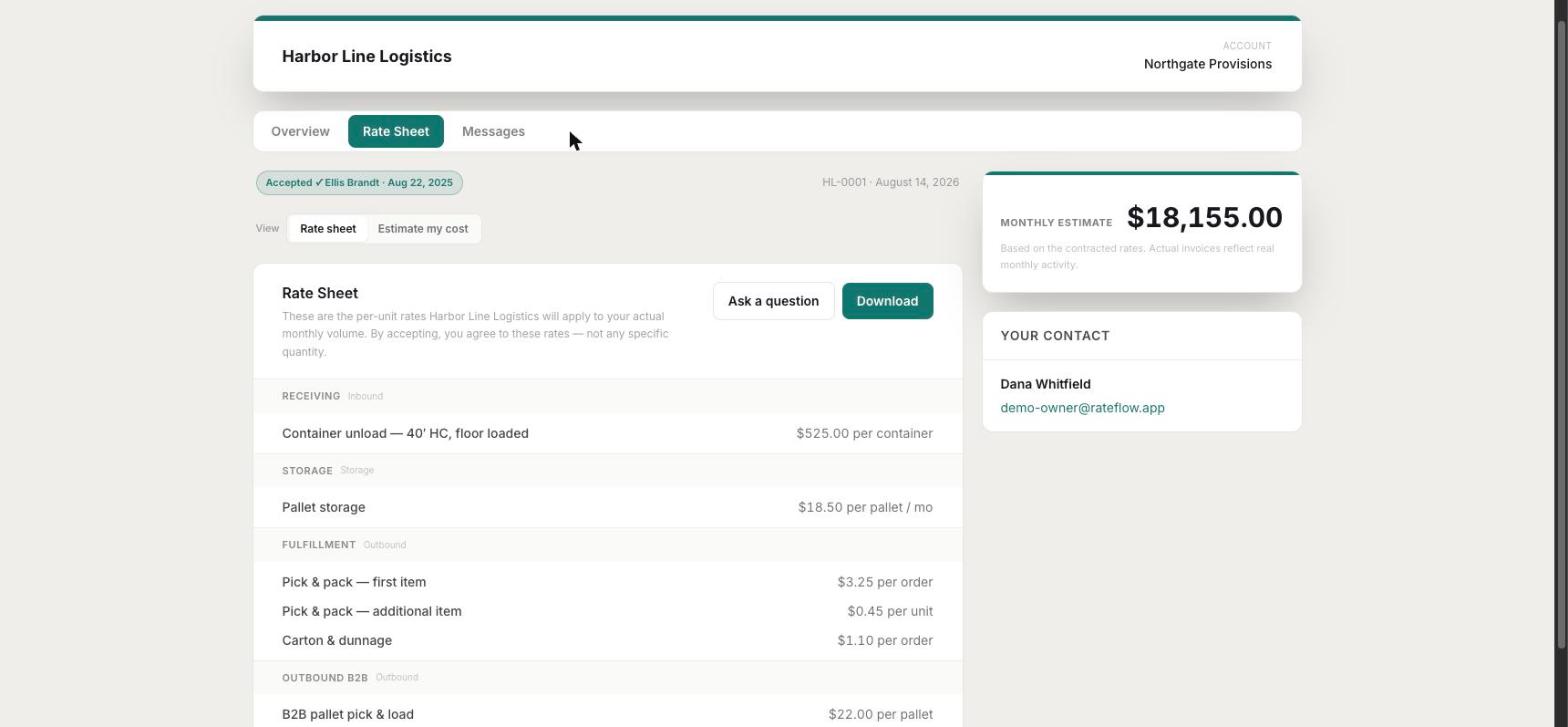
A branded page with your colours and logo on it, where the client moves their own volumes and watches the sheet re-price. Move the sliders below — this is the real thing, with demo rates.
This is what your client gets. They move their own volumes and the rate sheet re-prices in front of them — same rates, no surprises on the first invoice.
| Service | Qty | Rate | Total |
|---|---|---|---|
| Container unload — 40′ HC, floor loadedReceiving | 4/ container | $525.00 | $2,100.00 |
| Pallet storageStorage | 420/ pallet / mo | $18.50 | $7,770.00 |
| Pick & pack — first itemFulfillment | 1,850/ order | $3.25 | $6,012.50 |
| Pick & pack — additional itemFulfillment | 2,405/ unit | $0.45 | $1,082.25 |
| Carton & dunnageFulfillment | 1,850/ order | $1.10 | $2,035.00 |
| B2B pallet pick & loadOutbound | 95/ pallet | $22.00 | $2,090.00 |
- Receiving10%
- Storage37%
- Fulfillment43%
- Outbound10%
- Effective cost / order
- $11.40
- Effective cost / pallet
- $50.21
Both figures are derived from the total above, not quoted separately — which is the point. A client who can see the blended number stops asking you to justify the storage rate in isolation.
In the real portal this sheet carries your branding, the client types their name to accept, and the rates they accepted are frozen exactly as shown — $1,500 minimum and all.
Questions land on the quote
The client asks in the portal and you answer from the account — thread visible on both sides. The answer to “does that storage rate include the pallet in?” stops living in one rep's inbox.
You can ask them things too
Send a structured information request — dimensions, case pack, monthly volume, carrier preference — and their answers come back attached to the quote instead of scattered across six replies.
Accepted with a typed name
No DocuSign seat required. They type their name, it's timestamped, and the acceptance is logged against the account.
The portal doesn't expire on acceptance
It becomes their account page — current rate sheet, the documents you've shared, and the conversation, available whenever they go looking.
03 — Freeze it
The version you can point at in eighteen months.
What they accepted becomes a snapshot: every line, every rate, in the order it was presented. Not a link to a document that has been edited four times since.
The accepted sheet is the record
Downloadable by you and by them, identical to what was on screen when they signed. Revisions keep their history rather than overwriting it.
Agreements filed against the account
Rate sheets, signed agreements, addendums and the odd scanned PDF a client sent in 2019 — filed per client, searchable, and readable.
Pre-Rateflow accounts get a baseline
Clients you signed years ago can have their agreed rates entered as a baseline, so the comparison works for the whole book and not only new business.
Review dates that surface themselves
Contract start, rate lock period, review cadence. Anything due inside 90 days shows up on the dashboard instead of in a calendar reminder nobody set.
04 — Check it
Then the invoices come back on their own.
Your billing already goes out by email. Rateflow rides along on that send, reads the invoice, and files it against the account — so the comparison builds itself month by month without anybody exporting anything.
Quoted vs actual, month by month
Storage pallets, pallets in, orders, containers, billing — what you quoted next to what happened, with the direction of the gap called out in words.
Accounts that changed shape
A client whose volume moved but whose billing didn't is the specific thing this is looking for, and it's the thing a spreadsheet review always misses.
Rates that drifted off the card
When an invoice bills a rate that isn't the one on the account's card, that's a finding — not something you notice two years later.
A defensible rate conversation
Walking into a review with their own volumes and their own invoices is a different meeting from walking in with “costs have gone up.”
The rest of it
The CRM around it, sized for a 3PL sales desk.
Enough to run the book, and deliberately nothing more. If you have five reps this is the right amount of software; if you have fifty you want something else.
Pipeline
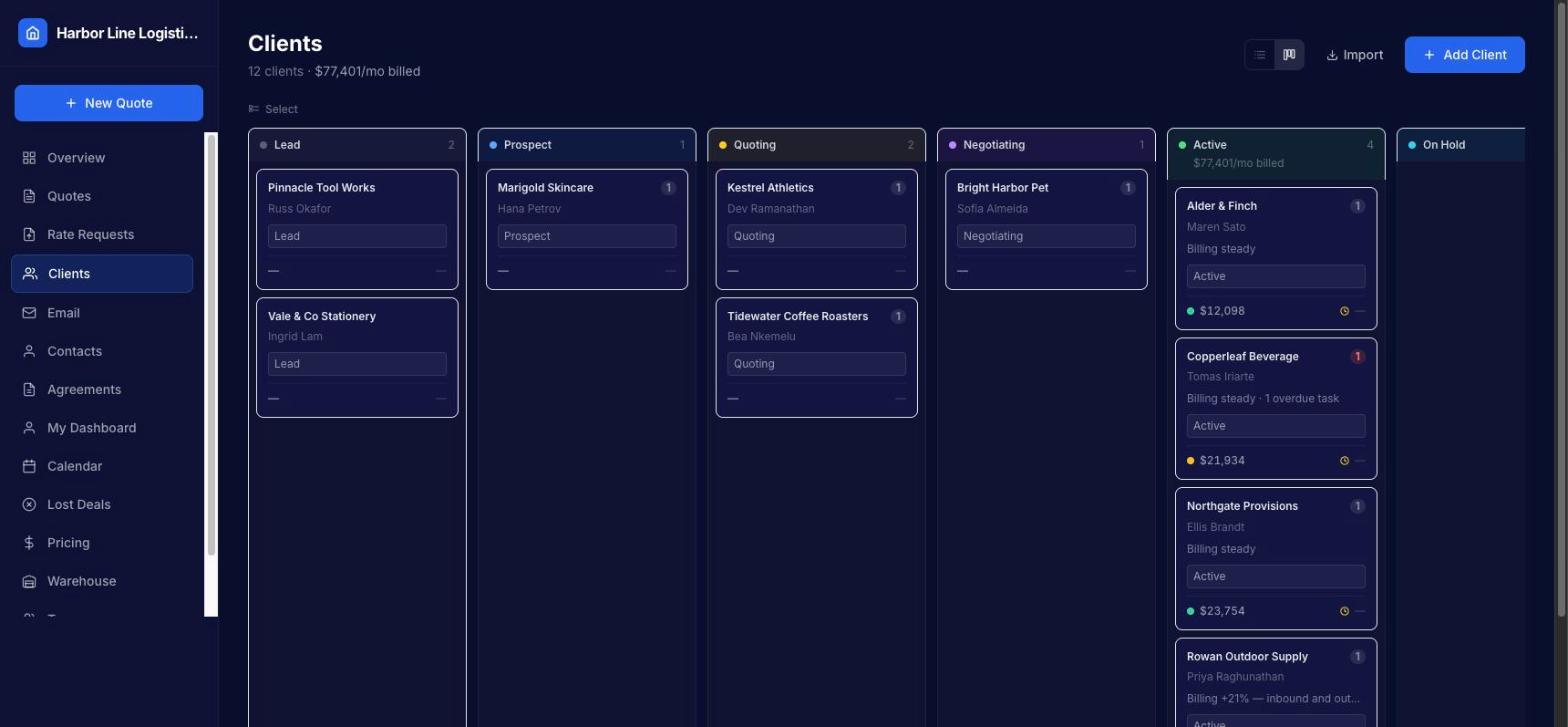
Lead through active, on a board or a list, with a required reason when something is marked lost so the cold book is worth reading later.
Email in one place
Threads with a client sit on the client, not in a personal inbox. Forwarded chains get folded down so you read the message, not the forwarding history.
Contacts and notes
Multiple contacts per account, notes with an author and a date, and an activity log that records what changed rather than that something changed.
Tasks and follow-ups
Due dates, overdue highlighting, and a queue on the dashboard of what's actually waiting on you today.
Calendar
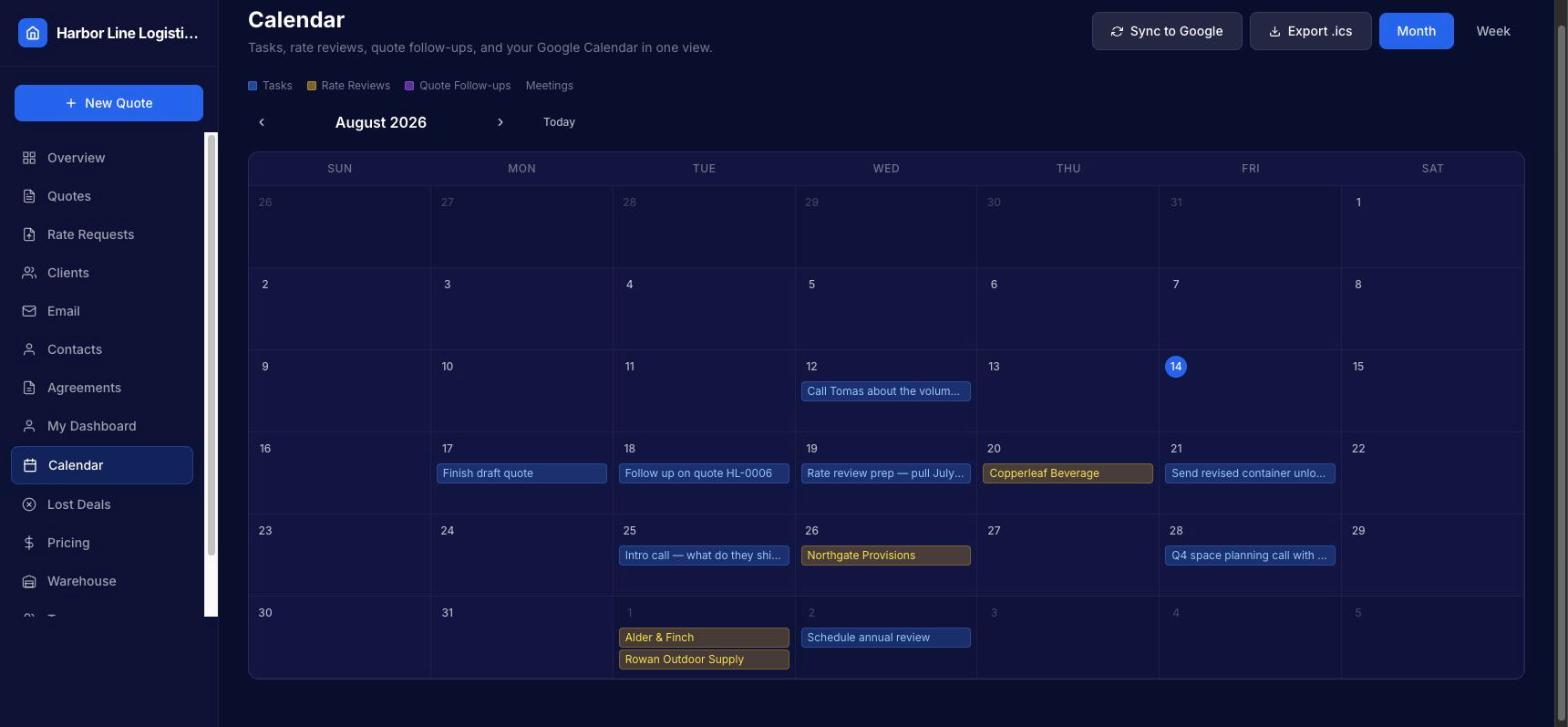
Tasks, rate review dates and quote follow-ups on one month view, with .ics export.
Import what you have
CSV import with field mapping, duplicate detection against your existing accounts, and a preview before anything is written.
Set up on a call, with your rate card in it.
Request setup to tell us you're interested. We'll get in touch, load your services and rates, and you'll start from something that already looks like your business.